
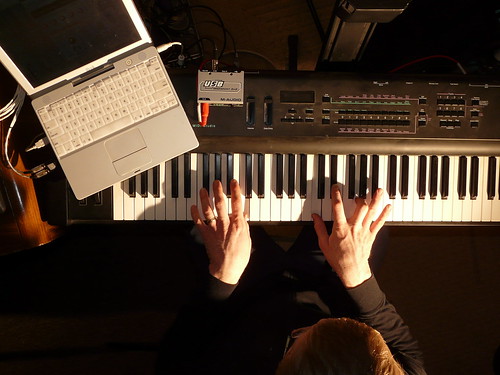
This week, I spent some time setting up a new instrument station in the chromedecay studio.
A few years ago, I replaced my trusty titanium PowerBook with a shiny new Intel MacBook. That brought lots of increased power, but as I mentioned in the post at the time, it meant losing some things I really liked as a result of moving from the PowerPC-based PowerBook to the Intel-based MacBook. My favorite Rhodes electric piano sound came from Logic’s EVP73 plugin, which didn’t run on Intel Macs. One of my other favorite sound sources was Reaktor Session, which I loved for its Vierring ensemble, among others.

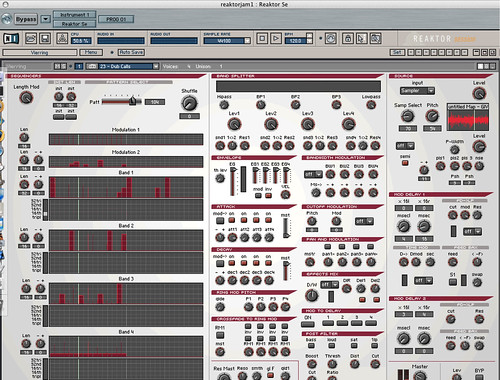
This week’s project, then, was getting an old 500MHz iBook set up to restore that lost functionality! I realized that I could install my old Logic Audio 6 on the iBook and set up EVP73 and Reaktor Session running inside it as AudioUnits plugins. I only get a couple instruments at a time, but that’s perfect – I’m still running Live 7 and Logic 7 on my MacBook Pro, and the audio from the iBook just gets routed straight into that.
Getting Logic installed and set up was a breeze – this is one place where having dongle-based copy protection makes this much easier than a networked challenge/response or authorization. I just plugged in my old Logic dongle, installed the program off CD, and I was up and running. Getting Reaktor Session going was a little more work – it uses a network-based authorization scheme, and I had to email Native Instruments support to get it authorized (to their credit, they turned it around in a day or two and it was quite simple after that).
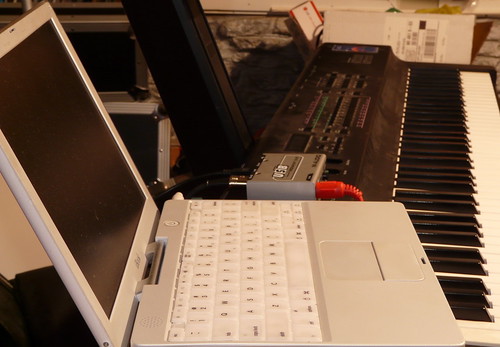
What I now have is an instrument station that consists of the iBook running Logic 6 with EVP73, Reaktor Session, and any other native Logic instruments I care to load up. It’s got a little 2-in/2-out MIDI interface connected over USB (thanks again, Kent!), which lets me connect my 76-key controller keyboard, as well as MIDI clock sync from the MacBook Pro rig. I can sit down at the keyboard, pull up a great Rhodes sound on the EVP73, and just play. That’s what I was really missing – the chance to just play, without having to worry about routing, plugins, compatibility, and so on.
Here’s a quick jam I recorded last night. The electric piano sound comes from EVP73, the synth sounds are from Reaktor Session’s Vierring ensemble, and the drums are being programmed in Live with a Drum Rack I built.
[audio:https://www.chromedecay.org/wp-content/uploads/2010/01/5_52_-rhodes-+-reaktor-session-jam.mp3|titles=5/52: rhodes + reaktor session jam]
download this audio track: 5/52: rhodes + reaktor session jam
A few detail photos:

Finally, if you’re interested, here’s a setup shot, showing how I took the self-portrait that’s at the top of this post:
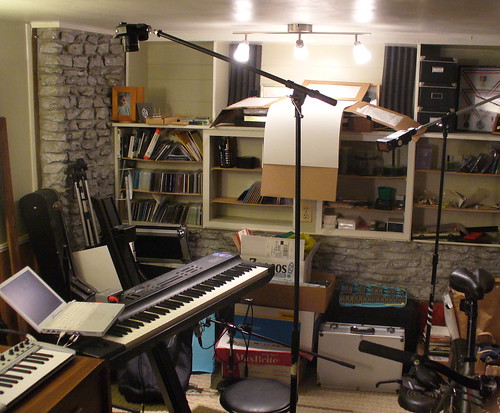
The camera for the shot (a Panasonic Lumix DMC-FZ18) is on a microphone boom stand, angled down using a Manfrotto mini ball head. The main light for the portrait is a Vivitar 283 with a 1/2 CTO gel (shown at the right of the photo), also on a microphone boom stand.
Also, you can see that the far end of the studio there is a bit of a mess. That’s another kind of project, though…
Really interesting and inspiring idea! But how can the iBook stand over your keyboard? Does it stand “as is” or did u use “something” between them?
I have an old iBook G4 1.33 and a Roland keyb, so I’d like to do what u did, but I want to place my ibook in a stable and safe position… I don’t want to risk that it fails over 😉
Any suggest?
@eldino – thanks for the comment. The iBook sits nicely on my controller (an Ensoniq KS32 76-key board) because there’s a wide, empty area on its top left. I can’t speak to what yours is like. I actually now have a second tier on the Ultimate Deltex stand that it’s sitting on, and the iBook is now up there, along with its MIDI interface. It’s perhaps a bit more stable.
Good luck setting up your own instrument station!
i didnt test yet how my iBook sits on my Roland keyb coz the keyb is packed, but i will soon 🙂 If they don’t fit together, i think i will buy some cheap ikea solution or i will do a little table myself 🙂 Thx for sharing ur studio pics, keep doing it 🙂 I added ur rss feed in my google reader 🙂 Peace!